
Why LMS Deployments Fail Before They Start
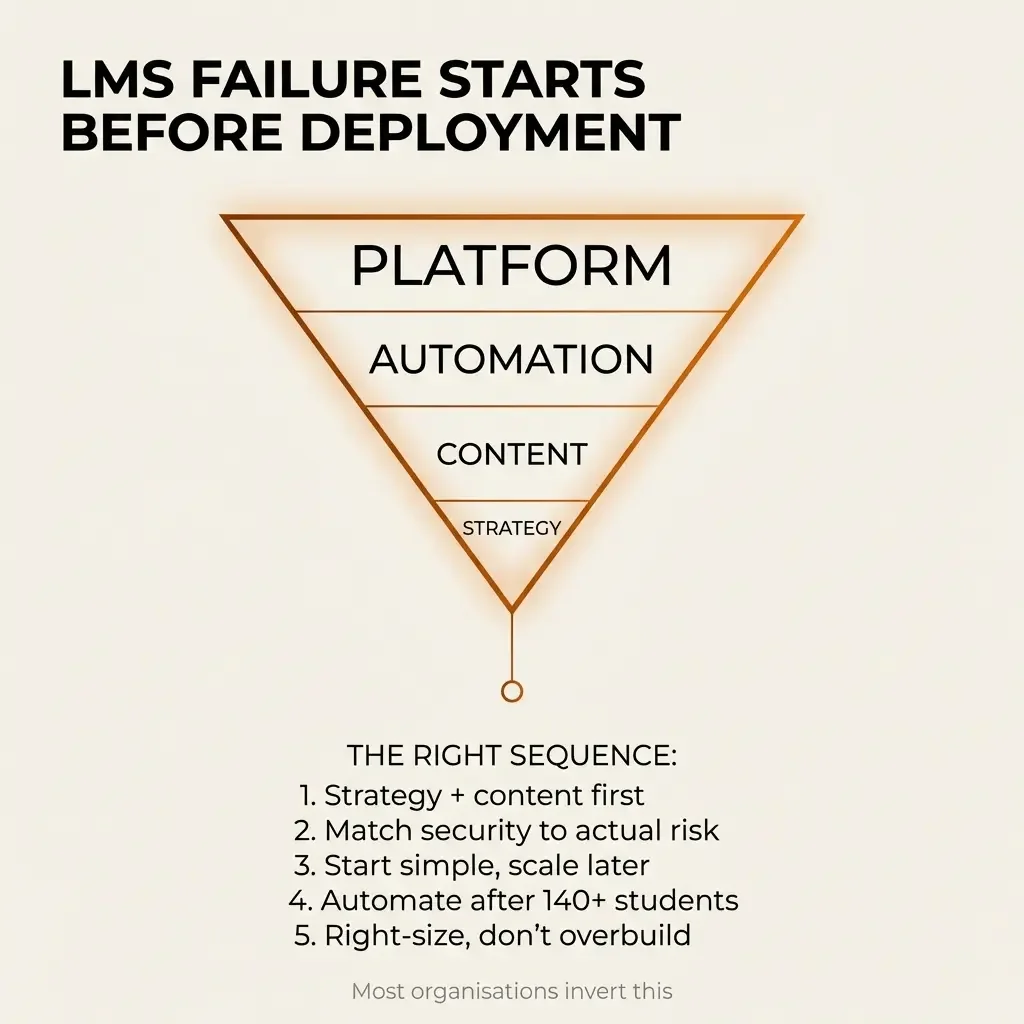
The first signal that an LMS deployment is headed for structural failure arrives before any technology gets evaluated. An organisation contacts us about deploying a learning management system. We ask about their courses. The answer: most of them aren't actually ready to deliver yet.
This pattern repeats across Australian organisations with remarkable consistency. The infrastructure gets built whilst the content remains in development. Six months later, they're caught in costly limbo—significant investment in technology, ongoing licence and maintenance fees, yet few students are receiving value.
The money that could have funded course production, face-to-face delivery, or web-based teaching sits locked up inside an empty LMS platform.
This isn't a technology problem. It's a structural misdiagnosis that occurs when organisations treat LMS selection as a feature-comparison exercise rather than an integration-architecture problem.
The Diagnostic Questions That Matter
Before touching technology, we ask questions that map operational context. Who is the student actually? Internal team members? Field workers outside the business IT network? Partner organisation employees? Customers? The answer eliminates entire categories of solutions immediately.
What kind of educational content exists, and what must the student achieve after exposure? The distinction between "complete the module" and "demonstrate competency in a specific task" changes the entire architecture. What does the student's workplace or learning environment look like? Phone-based learning during breaks requires fundamentally different infrastructure than desktop-based engagement with interactive 3D models for hazardous process training.
These questions reveal the maturity level before any platform gets discussed. If your own team needs bite-sized phone-based learning modules with non-controlled content, then a video tutorial on a hidden part of your website might do the trick. If students need to engage with hours of interactive content on desktop computers to learn and trial complex processes virtually, tracking their progress as they proceed… then the tech stack changes entirely.
The Security Classification Constraint
In the defence space, content sensitivity affects everything. It limits who can plan and write courses. It limits the ability to engage external 3D foundries. It limits the use of cloud-hosted content creation tools - Adobe Captivate remains one of the very few options for producing SCORM-compliant assets without sending data to the internet.
Security classification limits what creative teams are allowed to know and where they can store and use files. It affects how modern, interactive, or sophisticated the learning approach can be while maintaining compliance. Everything remains possible, but it comes at a significant cost.
Creating every asset in a compliant fashion, storing all content on your own network, hardening access to your business network, choosing one of the few LMS platforms that can be deployed totally on-premise, managing SSO and timeouts and defence-specific access hardening protocols, then being excluded from using most AI tools to streamline workflows—this adds in excess of $20,000 AUD just to the initial project costs. Monthly maintenance fees, penetration testing services, and security-enhanced IT infrastructure significantly amplify the associated operational expenditure.
The LMS Maturity Spectrum
There's no single "best LMS" because the appropriate solution depends on the required security posture, content maturity, internal IT capability, compliance obligations, user volume, workflow automation needs, budget tolerance, and long-term scaling intent. Modern LMS architecture sits on a spectrum from low-cost public web delivery through to hardened, defence-grade, AI-enabled ecosystems.
Website-Based Delivery: The Strategic Stopgap
Below $30,000 AUD, you're probably building a website with controlled access, not an LMS. This distinction matters functionally. You can build a site and give people controlled access to educational webpages for under $10,000 all-in, and under $20,000 for a more mature website, online shop, and integrated login-controlled educational experience. It’s still a website really though.
Those webpages can use text, interactive 3D models, videos, surveys, and all the assets used for adult education. They won't have full managed learning paths, automated certification processes, or other features that only come from an LMS. But for early-stage businesses or organisations with low compliance risk, this model tests course-market fit without overbuilding the infrastructure.
Not requiring military-grade security means you can also use the latest content creation software to make educational assets more engaging for students and to create them dramatically faster, giving substantially more value for the budget invested.
Enterprise E-Commerce + LMS Integration
Commercial training providers selling courses to the public need a different infrastructure. When organisations need to accept purchase orders rather than having individual students pay online, enterprise-class websites with API integration to pre-register learners into an LMS become necessary. This moves from "website with content" to "workflow-enabled learning commerce."
These deployments can operate within DISP, Essential 8, or ISO 27001 ecosystems, with dedicated technical support designed for long-term performance. The investment typically ranges from $20,000 to $30,000 AUD, depending on the level of automation required.
Pure Microsoft 365: The Compliance-First Approach
For internal employee training in high-compliance environments, organisations already paying for Microsoft 365 can keep content inside their business network with access controlled via Microsoft permissions. Forms handle testing, certificate issuance remains manual, and minimal additional cost is incurred whilst also reducing the external attack surface.
This isn't a true LMS. The user experience remains basic, and additional configuration for 2FA and inactivity controls becomes necessary. But when polish isn't the priority, and compliance matters critically, this highly compliant, low-tech solution works just fine.
Microsoft 365 + LMS Overlay
Organisations deeply invested in Microsoft who need structured internal learning can deploy LMS overlays like Zensai as fully integrated Teams apps. These provide SCORM support, progress tracking, and certification renewal alerts whilst also living inside your controlled IT environment.
The constraint: these aren't defence-native, lack dedicated Australian support, and function as app-level systems rather than full standalone LMS platforms. But they bridge compliance comfort and LMS functionality for organisations with moderate requirements.
Moodle + Custom Hardened Deployments
Defence-adjacent organisations with large-scale user bases and long-term control requirements face different economics. Open-source Moodle actually reduces risk in these contexts. It's trusted by governments and universities globally because it's been around for quite some time. It's a mature technology—most bugs have been shaken out already.
All these enterprise users form part of the security testing ecosystem related to Moodle too. There are many thousands of people globally working to keep their Moodle LMS investments safe, secure, and functional. This wealth of best practice comes as part of the package when you go for a custom Moodle deployment.
According to Moodle's security documentation, unlike proprietary software where code is hidden and reviewed by few people, Moodle's open-source approach ensures source code is constantly monitored by large numbers of people from the community. Organisations apply rigorous cybersecurity reviews to their software solutions, well beyond industry standards, and frequently share findings with the development team.
A startup with just a couple of people making a new ‘AI LMS’ in their garage might look appealing, but it doesn't stack up when you need real, not imagined, security. Moodle can be deployed on-premise with Essential 8 ML2 wrapping, DISP alignment, local support, and admin access segmentation. There's also no per-user cost scaling, making it the best long-term control and scale option when compliance and data sovereignty matter.
The constraint: military grade deployments require patch management discipline with 48-hour security patching requirements, upfront hardening costs, and mature IT governance. But for defence-adjacent organisations, the platform maturity and distributed security testing becomes an asset in high-consequence environments, not a liability.
AI-Enabled Enterprise LMS
Large enterprises with heavy content authoring needs and organisations prioritising AI productivity can deploy platforms like Paradiso with ISO 27001 and SOC2 compliance, SSO, on-premise or AWS Sydney hosting, built-in content authoring, and strong SharePoint integration.
These systems come with higher annual licensing costs, aren't defence-native, and lack local Australian support. They're powerful and feature-rich though, just not automatically appropriate for regulated Australian sectors.
The Automation Economics Threshold
Purchase-to-enrolment, student progress management, certificate generation, and renewal notifications can be painful to manage manually. But if your courses are free or low-revenue, or student numbers are modest, it's fine for a person to manage these processes. You can use it as an opportunity to learn and refine your processes before investing in automation.
The economic threshold becomes clear when you calculate costs. If your team member costs the business $70 per hour fully loaded, and it takes half an hour per student to manage enrolment, progress tracking, certification, and renewals, you need to process over 140 students per year before an automation investment of $5,000 to $10,000 AUD pays for itself.
That calculation changes if that team member can perform substantially higher-value work when you give them that time back. But the principle remains: manual processes aren't just acceptable early on, they're actually valuable for learning and refinement before you automate the best version of those processes.

The Perception Problem
The most common resistance point when presenting this maturity-aligned framework isn't security posture or automation layers. It's wanting to feel like a mature business in the eyes of customers. ‘LMS’ sounds more sophisticated than ‘website with educational material’, even when the website solves the problem more efficiently.
Then comes wanting top-notch security. We'd all like military-grade protection, but sometimes good enough is genuinely good enough. When you don't have defence-grade requirements, that reality opens up dramatically more cost-accessible options.
A 2024 Gartner report estimates that 70% of digital transformation projects, including LMS rollouts, face delays or fail to meet expectations due to poor planning. This substantiates the claim that organisations consistently misdiagnose LMS selection as a feature-comparison exercise rather than an integration-architecture problem.
Research shows that 88% cite poor user experience as the main reason for switching learning tools. Organisations overengineer platforms without validating actual user workflows, then experience abandonment regardless of feature sophistication. Low user adoption remains the most common risk following LMS deployment, demonstrating that sophisticated infrastructure without organisational readiness basically guarantees costly limbo.
What Success Actually Looks Like
When you successfully right-size a solution and an organisation deploys something appropriately modest—for example, that $10,000 website instead of a $40,000 hardened LMS—success becomes visible within six months. They're up and running, delivering student outcomes.
Otherwise, they're still developing and testing, producing SCORM files for their future training programme, or still trying to get their finance controller to approve the needed budget. The primary success indicator isn't feature sophistication or platform capability. It's actually delivering student outcomes within months rather than remaining trapped in development, budget approval, or technical complexity.
The Integration Architecture Imperative
LMS deployment fails when organisations treat it as technology procurement rather than integration architecture design. The platform sits at the intersection of IT infrastructure, compliance frameworks, content development workflows, and commercial operations. When these functions remain separated without an integration architecture plan, the gap between intended trajectory and delivered reality persists. It’s about the student, and cross-functional alignment, not just platform selection.
The Strategic Recommendation Framework
The appropriate solution aligns with the specific organisational context:
Website model when testing the market with limited courses and modest student numbers, or when you'll never require massive training catalogues or significant access security on the content.
Web Shop + LMS automation when selling training commercially and needing purchase-order workflows or student account-based content access.
Microsoft 365 when training internal staff in secure environments where compliance matters more than polish.
Zensai or a similar M365 overlay for tracking and compliance, plus true LMS features inside Microsoft 365 (not cheap).
Hardened Moodle for defence-adjacent organisations with scale requirements and long-term control needs (note that Moodle deployments can actually be very cost-efficient when DISP and Essential 8 security upgrades are not mandatory).
AI-enabled enterprise platforms for large enterprises with genuine AI content authorship ambitions and budgets that support significant annual licensing costs.
Arrow recommends all these solutions based on context, not preference. The best LMS aligns with strategy, compliance, automation maturity, and scale. Avoid overbuilding early. Align learning architecture with business architecture. Plan for progression, not perfection.
Summary
LMS deployments fail before they start when organisations optimise for perception rather than operational reality. The fundamental misdiagnosis treats LMS selection as feature comparison when it's actually an integration architecture problem determined by security posture, compliance obligations, content readiness, and automation maturity.
Security classification becomes the primary constraint that eliminates entire categories of solutions before feature evaluation begins. For organisations without defence-grade requirements, dramatically more cost-accessible options open up—website-based delivery under $10,000 or enterprise e-commerce learning integrations for around $20,000 versus hardened deployments at $30,000 to $50,000+.
Content maturity matters critically. Building sophisticated platforms before validating content quality creates expensive infrastructure that sits idle. Manual processes aren't failure states early on—they're valuable for learning and refinement before automating. The economic threshold sits at approximately 140 students annually before an automation investment of $5,000 to $10,000 pays for itself.
Success within six months means delivering student outcomes, not still developing courses or seeking budget approval. The intervention point matters critically—it's too late to right-size your learning management approach after you’ve paid for it! The diagnostic questions about student identity, content type, required achievement, and learning environment reveal true maturity level needs before any technology stack gets discussed.
The maturity spectrum ranges from website-based delivery to Microsoft 365 approaches, to hardened LMS deployments, and to AI-enabled enterprise platforms. Each serves specific contexts. None is universally ‘best’. The appropriate solution aligns with strategy, compliance, automation maturity, and scale whilst avoiding the perception-driven overbuilding that erodes organisational budgets before the actual content exists.
In the modern business landscape, 'outsourcing' has evolved from a cost-cutting tactic into a strategic cornerstone for growth and agility. Across Australia, organisations of every size are realising that the world now moves too fast for any one team to master everything. You might be a manufacturer, a government agency, a software company, or a research institution — each must excel not only in its core function but also in strategy, marketing, technology, automation, and stakeholder engagement. Few organisations can build deep, full-time capability in all of those areas.
By Jeff Anderson, Founder & Lead Consultant, Arrow Strategic Communications
